What is AutoSSL?
AutoSSL is WHM/cPanel solution activated by default in your hosting account as it automatically installs and renews cPanel/Sectigo certificates for each domain in cPanel.
AutoSSL performs an automatic check of all domains and if necessary install new or renews the already installed cPanel/Sectigo certificates.
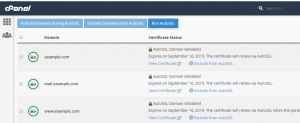
You can easily check, manage or exclude a specific domain from AutoSSL through cPanel » SSL/TLS Status.
AutoSSL performs an automatic check of all domains and if necessary install new or renews the already installed cPanel/Sectigo certificates.
You can easily check, manage or exclude a specific domain from AutoSSL through cPanel » SSL/TLS Status.
How to enable AutoSSL / Free SSL in cPanel
Make sure the website is pointing to your server with us. Use a DNS checker to make sure the IP address of the A record is the same as your server IP.
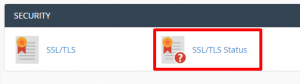
1. Login to cPanel and select SSL/TLS Status.
1. Login to cPanel and select SSL/TLS Status.
2. Next, select Run AutoSSL.
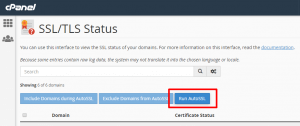
3. You may have to wait for 1 hour for the free SSL installation. Make sure to check the “+ Include during AutoSSL” under the chosen domain/subdomain in the list of domains.